This is a guide on how to have destructible foliage such as in games like Valheim, and Rust. It’s developed with Replication and Multiplayer in mind, and works without spawning any new actors, all handled in InstancedStaticMesh Components and a GameState component.
I started with looking at World Partition and PCG to manage this, dividing the world into cells and tracking resource state per cell. While I do use World Partition in my project, I realized this system doesn’t actually need it. Instanced Static Meshes already come with built-in culling and visibility, and layering cell-based state management on top would only add complexity without real performance gains.
Left = Authority Server, Right = Client. Ignore the vertical line, it’s for visual debugging
The Setup
Instead of individual actors, lean into Unreal’s strengths: Procedural Content Generation (PCG) for placement and Instanced Static Meshes (ISMs) for rendering.
Here’s the setup:
- Create a blueprint actor (with
Replicatesset totrue) and place it in your level, i.e. “RockSpawner”. - Give it a Box Collision component to define the spawn area
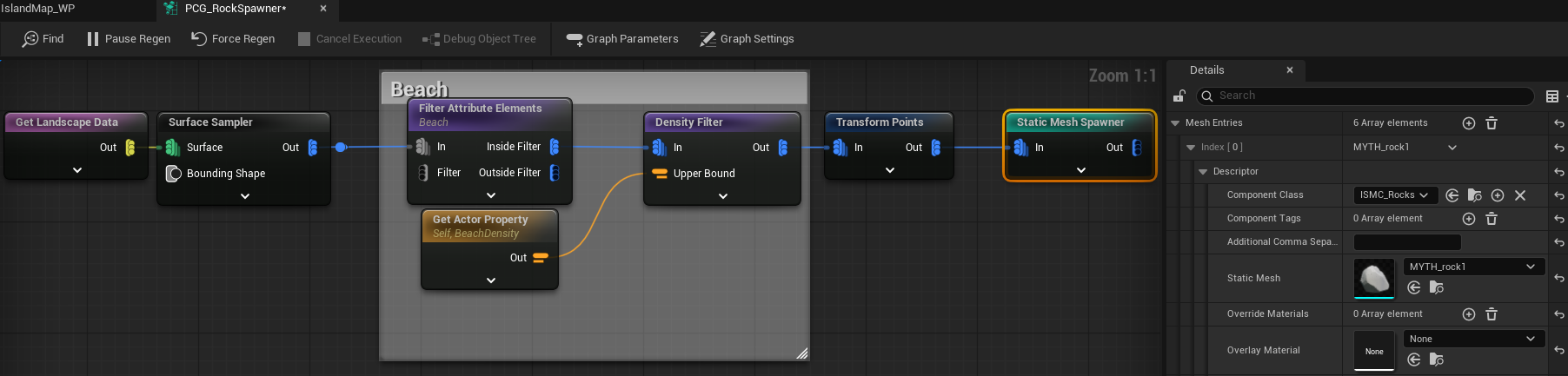
- Configure a PCG graph to procedurally place your resources using our custom ISM component.
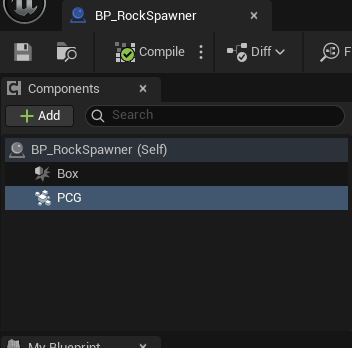
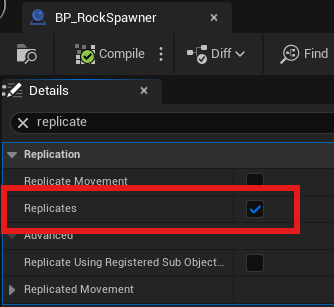
When this actor is put into the world, PCG runs and adds the custom ISM component to this actor. To access the ISM across the network, this actor MUST HAVE the
Replicates property set to true.
The PCG graph handles placement logic—tree density, rock clusters, terrain-based spawning rules. But here’s the key: everything spawns as instances in ISM components, not individual actors.
Here is a sample PCG graph that spawns rocks:
Why ISMs? They’re designed for exactly this use case. Thousands of identical meshes rendered with incredible efficiency. Plus, they handle culling automatically—distant instances don’t waste GPU cycles.
The Custom ISM Component
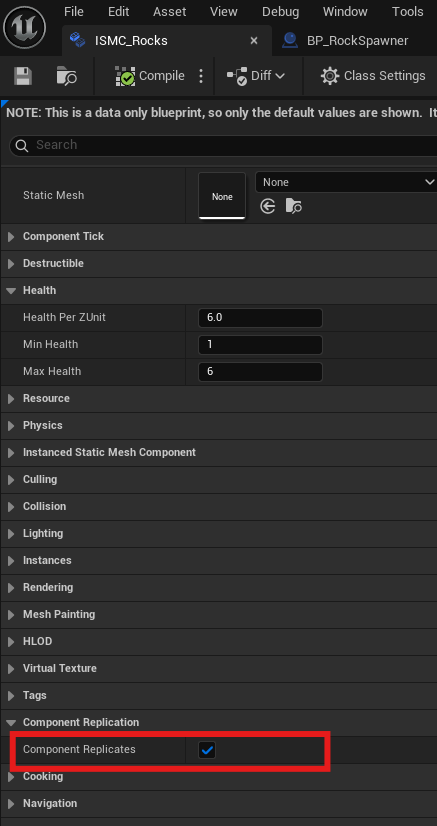
Generic ISM components won’t cut it for interactive resources. You need a specialized version that understands destruction, health, and rewards. This ISM component MUST be replicated
UCLASS()
class MYTHIC_API UResourceISM : public UInstancedStaticMeshComponent {
    GENERATED_BODY()

private:
    // Track destroyed instances to prevent double destruction
    UPROPERTY()
    TSet<int32> DestroyedInstances;

public:
    // Health configuration per resource type
    UPROPERTY(EditAnywhere, BlueprintReadOnly, Category = "Health")
    FDestructibleHealthConfig HealthConfig;

    // What players get for destroying this resource
    UPROPERTY(EditAnywhere, BlueprintReadWrite, Category = "Resource")
    FRewardsToGive OnKillRewards;

    // Resource type for organization (trees, rocks, etc.)
    UPROPERTY(EditAnywhere, BlueprintReadWrite, Category = "Resource")
    FGameplayTag ResourceType;
};
Again, just like how we set the Replicates property on the “RockSpawner” actor, we set it on the ISM component. This ensures the ISM component can be
replicated across the network. This component will be automatically added to the “RockSpawner” actor when it’s placed in the world by PCG, and since we set
Replicates to true in the component’s blueprint, it will be replicated.
The TSet<int32> DestroyedInstances is crucial. It tracks which instances are “gone” locally, preventing weird bugs like harvesting the same tree twice. A
TSet gives you O(1) lookup performance—perfect for quick “is this already destroyed?” checks.
The health system is flexible. Different tree sizes can have different health values based on their Z scale (height):
USTRUCT(BlueprintType)
struct FDestructibleHealthConfig {
    GENERATED_BODY()

    // Bigger trees = more health
    UPROPERTY(EditAnywhere, BlueprintReadWrite, Category = "Health")
    float HealthPerZUnit = 6.0f;

    UPROPERTY(EditAnywhere, BlueprintReadWrite, Category = "Health")
    int32 MinHealth = 1;

    UPROPERTY(EditAnywhere, BlueprintReadWrite, Category = "Health")
    int32 MaxHealth = 6;
};
A massive oak tree might take 6 hits to fell, while a sapling only takes 1. The system calculates this automatically based on the instance’s scale.
The Resource Manager Component
Here’s where most systems break down. Networking thousands of dynamic objects is hard. The solution? Centralize everything in a single, authoritative component on the GameState.
USTRUCT(BlueprintType, Blueprintable)
struct FTrackedDestructibleData : public FFastArraySerializerItem {
    GENERATED_BODY()

    // Instance index/id
    UPROPERTY(BlueprintReadWrite, EditAnywhere, Category = "Resource")
    int32 InstanceId = -1;

    // The original transform of the resource used for respawn
    UPROPERTY(BlueprintReadWrite, EditAnywhere, Category = "Resource")
    FTransform Transform = FTransform::Identity;

    // Remaining hits required to mine this resource
    UPROPERTY(BlueprintReadWrite, EditAnywhere, Category = "Resource")
    int32 HitsTillDestruction = 1;

    // The absolute time after which the resource can respawn
    UPROPERTY(BlueprintReadWrite, EditAnywhere, Category = "Resource")
    double RespawnTime;

    // The ISM this resource belongs to
    UPROPERTY(BlueprintReadWrite, EditAnywhere, Category = "Resource")
    UResourceISM *ResourceISM;

    bool operator==(const FTrackedDestructibleData &other) const {
        return other.ResourceISM == this->ResourceISM && other.InstanceId == this->InstanceId;
    }
};

UCLASS(ClassGroup=(Custom), meta=(BlueprintSpawnableComponent))
class MYTHIC_API UResourceManagerComponent : public UActorComponent {
    GENERATED_BODY()

    // Server-only tracking for damaged resources
    UPROPERTY()
    TArray<FTrackedDestructibleData> TrackedResources;

    // Replicated list of destroyed resources
    UPROPERTY(ReplicatedUsing=OnRep_DestroyedResources)
    FTrackedDestructibleDataArray DestroyedResources;
};
Two arrays handle different states:
- TrackedResources: Server-only tracking for damaged-but-not-destroyed resources
- DestroyedResources: Replicated list of completely destroyed resources
Why separate them? Most resources die in one hit. Only partially damaged resources need server-side tracking. This keeps the replicated data lean.
The Networking Secret: FastArraySerializer
Regular TArray replication is wasteful. Every time you add or remove an item, Unreal sends the entire array to every client. With thousands of resources, this kills bandwidth.
Enter FFastArraySerializer. Think of it like this: instead of sending your entire grocery list every time you add milk, you just send “hey, add milk.” Only
the changes (deltas) get transmitted.
USTRUCT(BlueprintType)
struct FTrackedDestructibleDataArray : public FFastArraySerializer {
    GENERATED_BODY()

private:
    UPROPERTY()
    TArray<FTrackedDestructibleData> Items;

public:
    // Only sends changes, not the full array
    bool NetDeltaSerialize(FNetDeltaSerializeInfo& DeltaParms) {
        return FastArrayDeltaSerialize<FTrackedDestructibleData, FTrackedDestructibleDataArray>(
            Items, DeltaParms, *this);
    }

    // Called when items are added on clients
    void PostReplicatedAdd(const TArrayView<int32>& AddedIndices, int32 FinalSize);

    // Called when items are removed on clients
    void PreReplicatedRemove(const TArrayView<int32>& RemovedIndices, int32 FinalSize);
};
The callbacks (PostReplicatedAdd, PreReplicatedRemove) are where the visual magic happens. When a resource gets destroyed on the server, clients receive the
destruction data and hide the instance visually.
The Destruction Flow
Here’s how a tree goes from “standing majestically” to “chopped down by Player A”:
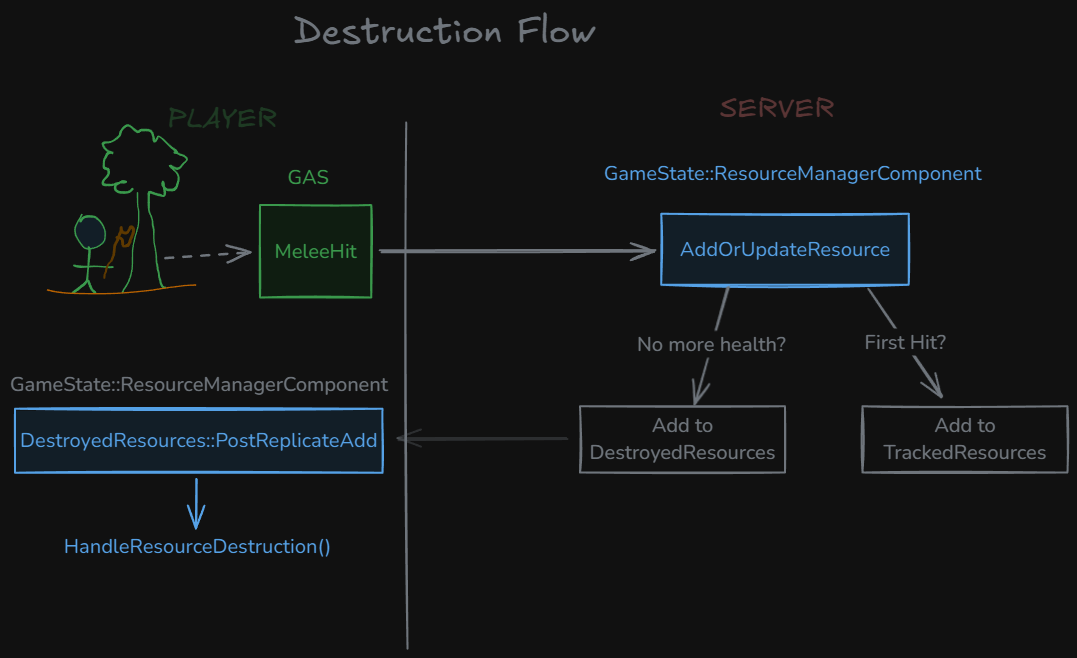
Step 1: Player Hits Tree
Player swings axe, hits tree. Hit detection runs on client, but damage processing happens on server. No cheating allowed. This will vary depending on your game.
In my project, I use GAS (Gameplay Ability System) for combat and hit detection. Here’s my ability that runs when a “Melee” ability has hit an actor with one of our custom ISM components.
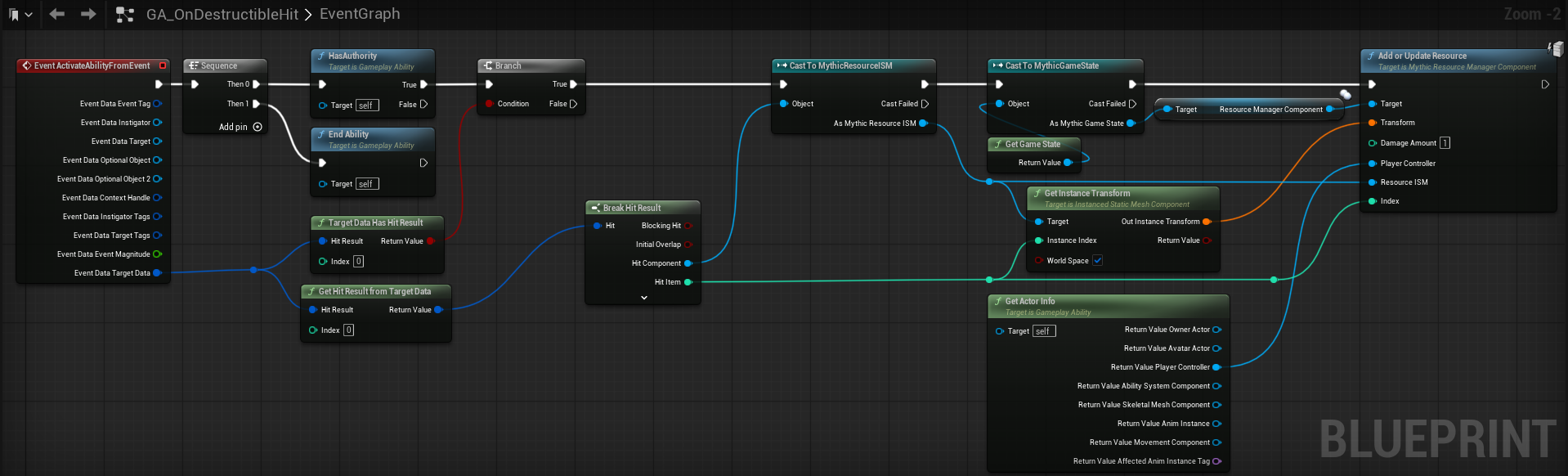
All this does is call AddOrUpdateResource() on the server with the hit data (damage, transform, player, ISMComponent, instance index).
Step 2: Server Validates and Tracks Damage
UFUNCTION(BlueprintCallable, Category = "Resource", BlueprintAuthorityOnly)
void AddOrUpdateResource(FTransform Transform, int32 DamageAmount,
                        APlayerController* PlayerController,
                        UResourceISM* ResourceISM, int32 Index) {
    // Security first - only server can process damage
    if (!GetOwner()->HasAuthority()) {
        return;
    }

    // Find existing damaged resource or create new tracking entry
    FTrackedDestructibleData* ExistingResource = TrackedResources.FindByPredicate([&](const auto& Resource) {
        return Resource.ResourceISM == ResourceISM &&
               Resource.InstanceId == ResourceISM->InstanceIndexToId(Index).Id;
    });

    if (ExistingResource) {
        ApplyDamageToResource(*ExistingResource, DamageAmount, PlayerController);
    } else {
        AddNewResource(Transform, DamageAmount, PlayerController, ResourceISM, Index);
    }
}
Step 3: Destruction and Rewards
When health hits zero, the resource moves from TrackedResources to DestroyedResources. This triggers replication to all clients. The server also hands out
rewards—wood, XP, rare materials, whatever you’ve configured.
void AddToDestroyedResources(FTrackedDestructibleData DestroyedResource, APlayerController* PlayerController) {
    // Set respawn time (5 minutes from now)
    DestroyedResource.RespawnTime = GetWorld()->GetTimeSeconds() + DefaultRespawnDelay;

    // Add to replicated destroyed list
    DestroyedResources.Items.Add(DestroyedResource);
    MarkItemDirty(Items.Last());

    // Manually call PostReplicatedAdd on server as it won't be called automatically
    TArray<int32> AddedIndices;
    AddedIndices.Add(DestroyedResources.Items.Num() - 1);
    PostReplicatedAdd(AddedIndices, DestroyedResources.Items.Num());

    // Give rewards to the player who destroyed it
    DestroyedResource.ResourceISM->OnKillRewards.Give(PlayerController, false);
}
Step 4: Visual Synchronization
When DestroyedResources gets updated, clients receive the change via PostReplicatedAdd. This calls the visual destruction handler:
// This static function is only called OnRep of the MythicResourceManagerComponent's DestroyedResources array to catch up state on clients
void UResourceManagerComponent::HandleResourceDestruction(const TArray<FTrackedDestructibleData>& DestroyedResources) {
    // All ISM Components that need to be dirtied once after processing
    TSet<UResourceISM*> ISMsToDirty;

    // Hide the instances that are destroyed
    for (const auto& Resource : DestroyedResources) {
        auto ResourceComponent = Resource.ResourceISM;
        if (ResourceComponent) {
            // Destroy / Hide resource
            ResourceComponent->DestroyResource(Resource.InstanceId);

            // Track ISM to dirty once after batch to reduce render updates
            ISMsToDirty.Add(ResourceComponent);
        }
    }

    // Dirty render state once per ISM after processing all instances
    for (UResourceISM* ISM : ISMsToDirty) {
        if (ISM) {
           ISM->MarkRenderStateDirty();
        }
    }
}
IMPORTANT: You never actually remove instances from the ISM array. Removing instances shifts all the indices, breaking synchronization. Instead, you hide the instance by moving it underground:
void UResourceISM::DestroyResource(int32 InstanceId, FTransform Transform) {
    int32 InstanceIndex = GetInstanceIndexForId(FPrimitiveInstanceId(InstanceId));

    // Get current transform and hide it way below ground
    FTransform CurrentTransform;
    GetInstanceTransform(InstanceIndex, CurrentTransform, true);

    FTransform HiddenTransform = CurrentTransform;
    HiddenTransform.AddToTranslation(FVector(0, 0, -999999));
    UpdateInstanceTransform(InstanceIndex, HiddenTransform, true);

    // Add to local destroyed tracking
    DestroyedInstances.Add(InstanceIndex);
}
New Player Synchronization
When a new player joins your game, they need to see the current world state immediately. They shouldn’t see trees that other players chopped down hours ago.
The OnRep_DestroyedResources function handles this elegantly:
void UResourceManagerComponent::OnRep_DestroyedResources() {
    // Hide all destroyed resources for this newly connected client
    auto Items = DestroyedResources.GetItems();
    HandleResourceDestruction(*Items);
}
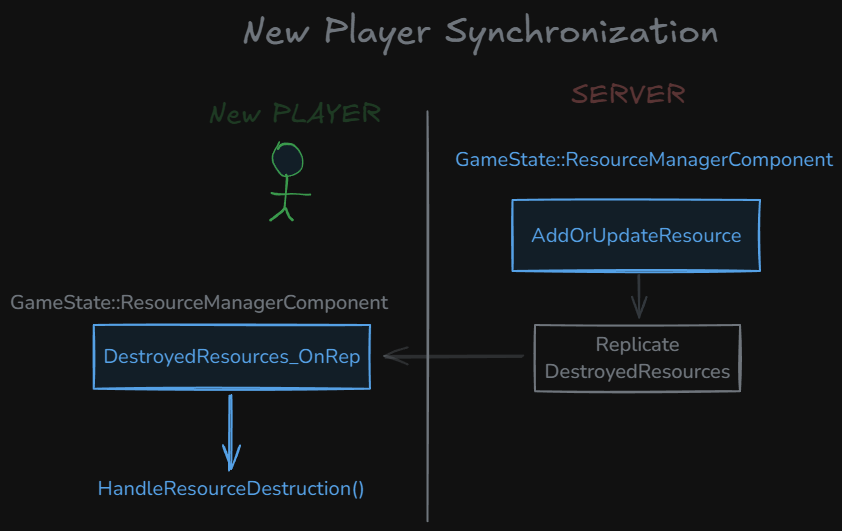
New players get the complete DestroyedResources array and immediately hide all destroyed instances. The world state syncs instantly.
Respawning Destroyed Resources
Static destruction gets boring. Resources should regenerate over time to keep the world feeling alive and provide ongoing gameplay opportunities.
The respawn system runs on a timer:
void UResourceManagerComponent::BeginPlay() {
    Super::BeginPlay();

    if (GetOwner()->HasAuthority()) {
        // Check for respawns every 10 minutes
        GetWorld()->GetTimerManager().SetTimer(
            BatchRespawnTimerHandle,
            this,
            &UResourceManagerComponent::ProcessBatchRespawn,
            BatchRespawnInterval, // 600 seconds
            true // Repeat
        );
    }
}
Every 10 minutes, the server checks which resources are ready to respawn:
void UResourceManagerComponent::ProcessBatchRespawn() {
    float CurrentTime = GetWorld()->GetTimeSeconds();
    TArray<int32> IndicesToRemove;

    // Any resources that are ready to respawn?
    auto DestroyedItems = DestroyedResources.Items;
    for (int32 i = 0; i < DestroyedItems.Num(); i++) {
        const auto& Item = DestroyedItems[i];
        if (CurrentTime >= Item.RespawnTime) {
            IndicesToRemove.Add(i);
        }
    }

    // Remove from destroyed resources
    if (IndicesToRemove.Num() > 0) {
        DestroyedResources.PreReplicatedRemove(RemovedIndices, Items.Num() - RemovedIndices.Num());

        for (int32 Index : RemovedIndices) {
            if (DestroyedItems.IsValidIndex(Index)) {
                DestroyedItems.RemoveAt(Index);
            }
        }

        MarkArrayDirty();
    }
}
When items are removed from DestroyedResources, it triggers PreReplicatedRemove on clients. This restores the instances to their original positions:
void UResourceISM::RestoreResource(int32 InstanceIndex, FTransform OriginalTransform, bool UpdateRender) {
    // Move back to original position
    UpdateInstanceTransform(InstanceIndex, OriginalTransform, true, UpdateRender);

    // Remove from local destroyed tracking
    DestroyedInstances.Remove(InstanceIndex);
}
Things to keep in mind
Never call RemoveInstance() on your ISM components. It shifts all instance indices, breaking network synchronization. Always hide instances instead.
All destruction logic must run on the server. Clients handle visuals only. Otherwise, players can cheat or create desync issues.
Test with players joining mid-game. They should immediately see the current world state, not the original spawn state.
Conclusion
Building multiplayer destructible resources the naive way leads to performance disaster. This system proves you can have thousands of interactive objects without melting servers or flooding networks.
The key insights that make it work:
- Work with Unreal, not against it: PCG handles placement, ISMs handle rendering and culling
- Centralize authority: One component manages everything, preventing chaos
- Network smart: FastArraySerializer only sends changes, not entire arrays
- Hide, don’t delete: Moving instances preserves indices and prevents desync
- Batch operations: Update rendering once, not per-resource
Taking it further, for my project I will add the following features:
- Seasonal respawn patterns: Some resources only respawn in spring
- Player proximity checks: Don’t respawn resources while players are watching
- Quality variations: Larger trees give better wood
- Tool requirements: Some resources need specific tools
- Territory control: Player-owned areas have different respawn rules
Also, for more advanced networking patterns, check out The Multiplayer Compendium by Cedric Neukirchen.
Source Code: Mythic Repo on Github
Related Reading: